> For the complete documentation index, see [llms.txt](https://esmp-fun.gitbook.io/plugins/llms.txt). Markdown versions of documentation pages are available by appending `.md` to page URLs; this page is available as [Markdown](https://esmp-fun.gitbook.io/plugins/markdown-guide/getting-started/the-web-editor.md).

# Edit in your browser

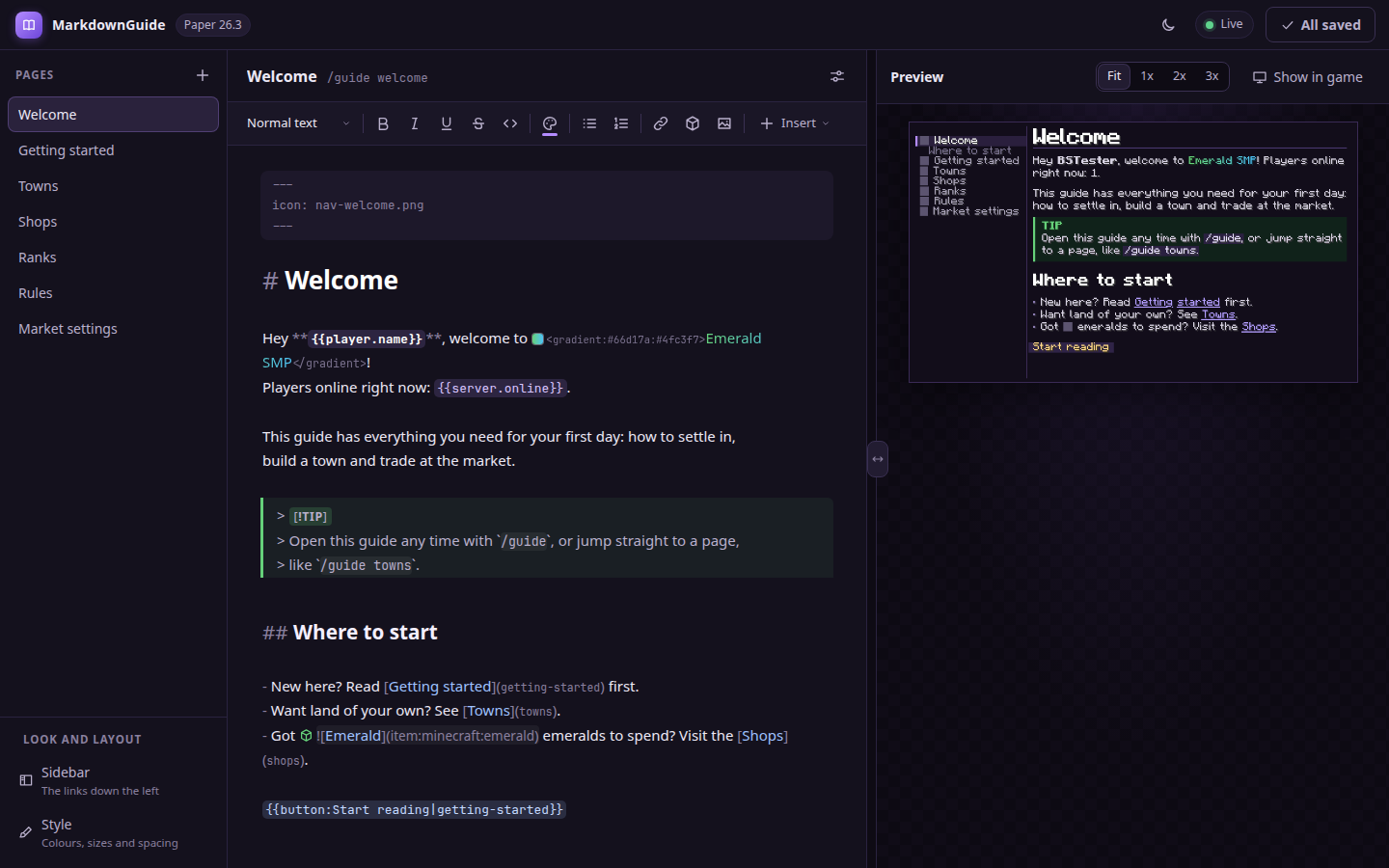
Edit your pages in a web browser, with the page shown beside them exactly as players will see it. Nothing to install, and your server doesn't have to be reachable from the internet: it only ever reaches out, so it works behind a router or on shared hosting.

<figure><img src="https://1037515809-files.gitbook.io/~/files/v0/b/gitbook-x-prod.appspot.com/o/spaces%2F37kaU8TF94yOlMmCwXdl%2Fuploads%2Fgit-blob-cbcda97a1f9a742a70b34caaf5621a0f2394c509%2Feditor-overview.png?alt=media" alt="The editor: pages on the left, the text in the middle, the page as drawn in game on the right"><figcaption><p>Your pages on the left, the text in the middle, and the page as the game draws it on the right.</p></figcaption></figure>

You need the `mdguide.editor` permission, which operators have.

## Step 1 - Get a link

In game, run:

```
/guide edit
```

and click **Click here to open the editor** in chat.

<figure><img src="https://1037515809-files.gitbook.io/~/files/v0/b/gitbook-x-prod.appspot.com/o/spaces%2F37kaU8TF94yOlMmCwXdl%2Fuploads%2Fgit-blob-3c3d379f5751818396c7ec12f1d3c450336632c9%2Fchat-editor-link.png?alt=media" alt="The link to the editor in chat"><figcaption></figcaption></figure>

## Step 2 - Trust your browser, once

The first time you open the editor in a browser, it shows a code, and your chat shows the same code with a **\[Trust this browser]** button. If the two match, click it. That browser is remembered, so you're only asked once.

<figure><img src="https://1037515809-files.gitbook.io/~/files/v0/b/gitbook-x-prod.appspot.com/o/spaces%2F37kaU8TF94yOlMmCwXdl%2Fuploads%2Fgit-blob-d9efe48f7b4f07a86d23e324ccf55ece192c8c59%2Feditor-trust.png?alt=media" alt="The editor showing a code to compare with the one in chat"><figcaption><p>Compare this code with the one in your chat.</p></figcaption></figure>

<figure><img src="https://1037515809-files.gitbook.io/~/files/v0/b/gitbook-x-prod.appspot.com/o/spaces%2F37kaU8TF94yOlMmCwXdl%2Fuploads%2Fgit-blob-6f39755f34ab7b4296ac8c46646a30c9f9a2acc4%2Fchat-editor-flow.png?alt=media" alt="The editor link, the trust button, and a warning about a second browser, in chat"><figcaption><p>Everything the editor tells you in chat, including a warning if a second browser tries the same link.</p></figcaption></figure>

Once trusted, the editor shows a live preview drawn by your own server, the **Show in game** button opens the page on your screen, unsaved changes and all, and **Save** writes straight to your server. The preview draws items and pictures as grey boxes the size they come out; **Show in game** shows them as they are.

## Writing

The editor edits the page's text itself, so nothing you didn't write ever changes. It styles the text as you type: headings are big, colours are coloured, and links and pictures are marked.

**The toolbar** does the formatting for you:

|                       |                                                                  |
| --------------------- | ---------------------------------------------------------------- |
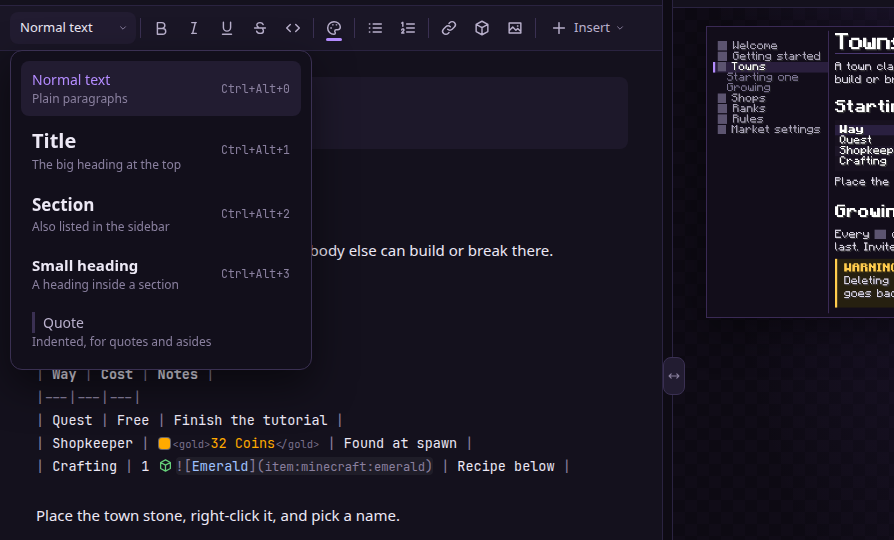
| **Normal text**       | Turns a line into a title, a section, a small heading or a quote |
| **B I U S** and `< >` | Bold, italic, underlined, struck through, and code               |
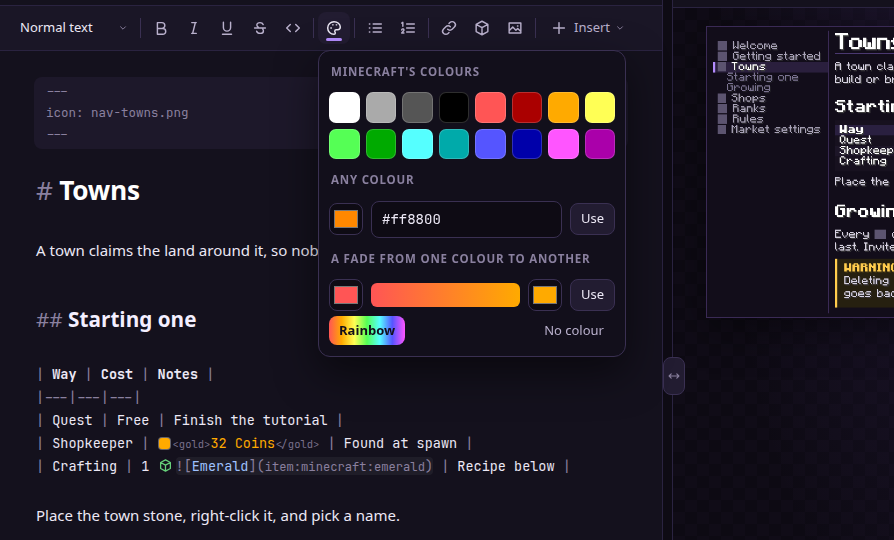
| **Colour**            | Minecraft's colours, any colour, a fade between two, or rainbow  |
| **Lists**             | Bullet points or numbered steps                                  |
| **Link**              | Words that open a page, a website or a command                   |
| **Item**              | A picture of any item or block, found by searching for its name  |
| **Picture**           | One of your own pictures                                         |
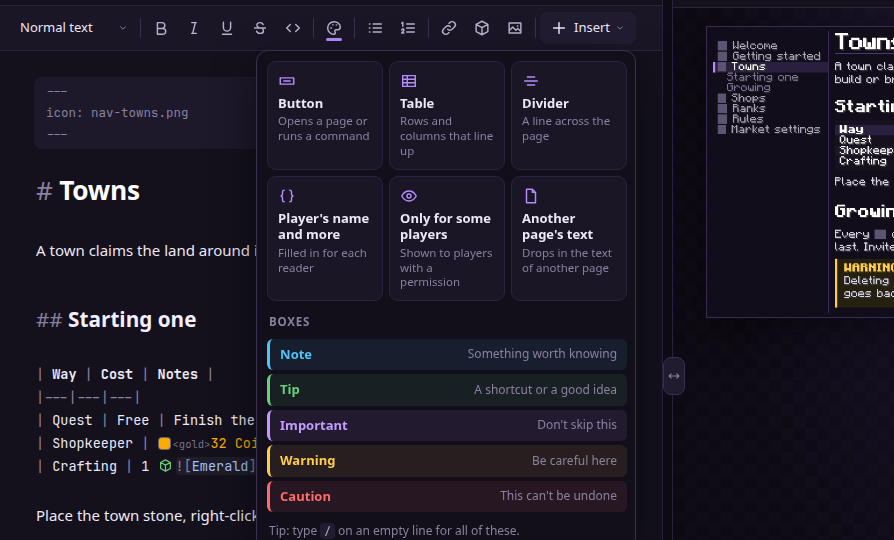
| **Insert**            | Buttons, tables, dividers, boxes, the reader's name, and more    |

<figure><img src="https://1037515809-files.gitbook.io/~/files/v0/b/gitbook-x-prod.appspot.com/o/spaces%2F37kaU8TF94yOlMmCwXdl%2Fuploads%2Fgit-blob-ac5a3a1c722b81ad8ac2a4bf4e1e7ff89b25f99a%2Feditor-text-style.png?alt=media" alt="The menu of text styles: normal text, title, section, small heading and quote"><figcaption><p>Each kind of heading says what it is for.</p></figcaption></figure>

<figure><img src="https://1037515809-files.gitbook.io/~/files/v0/b/gitbook-x-prod.appspot.com/o/spaces%2F37kaU8TF94yOlMmCwXdl%2Fuploads%2Fgit-blob-054dd9056bf71080cda7f73d1fdc0589784a4381%2Feditor-link.png?alt=media" alt="Adding a link that opens another page"><figcaption><p>A link to a page, a website or a command, without having to remember how one is written.</p></figcaption></figure>

<figure><img src="https://1037515809-files.gitbook.io/~/files/v0/b/gitbook-x-prod.appspot.com/o/spaces%2F37kaU8TF94yOlMmCwXdl%2Fuploads%2Fgit-blob-68620342b54879b916229ae4042e76db8ee32081%2Feditor-item-search.png?alt=media" alt="Searching for an item by name"><figcaption><p>Every item and block the game has a picture of, by name.</p></figcaption></figure>

<figure><img src="https://1037515809-files.gitbook.io/~/files/v0/b/gitbook-x-prod.appspot.com/o/spaces%2F37kaU8TF94yOlMmCwXdl%2Fuploads%2Fgit-blob-9866de4d04742bfe8b8095a05328f49250105cfe%2Feditor-colours.png?alt=media" alt="The colour picker"><figcaption><p>Minecraft's sixteen colours, any colour, or a fade between two.</p></figcaption></figure>

<figure><img src="https://1037515809-files.gitbook.io/~/files/v0/b/gitbook-x-prod.appspot.com/o/spaces%2F37kaU8TF94yOlMmCwXdl%2Fuploads%2Fgit-blob-85504514f9237e38ad30331d4419c29d7285e478%2Feditor-insert.png?alt=media" alt="The Insert menu"><figcaption><p>Everything else, in one menu.</p></figcaption></figure>

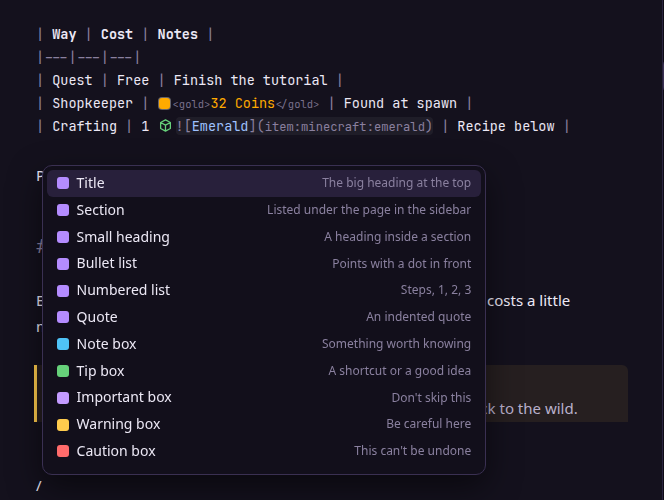
**Type `/` on an empty line** for the same menu without leaving the keyboard.

<figure><img src="https://1037515809-files.gitbook.io/~/files/v0/b/gitbook-x-prod.appspot.com/o/spaces%2F37kaU8TF94yOlMmCwXdl%2Fuploads%2Fgit-blob-e498f597654a5aa50a4cf29953466460a34731c5%2Feditor-slash-menu.png?alt=media" alt="The menu that opens on a slash"><figcaption></figcaption></figure>

**Suggestions come up as you type:**

| Type                      | And pick from                                 |
| ------------------------- | --------------------------------------------- |
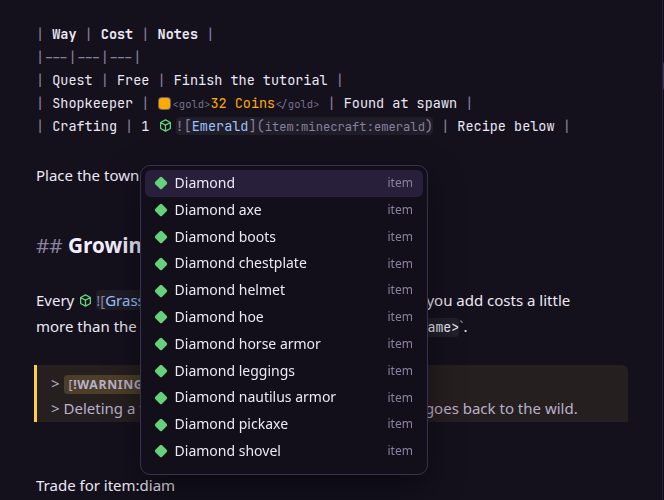
| `item:` and a few letters | Every item and block, turned into its picture |
| `](` after a link's words | Your pages                                    |
| `{{`                      | The reader's name and your other values       |
| `<`                       | Minecraft's colours and styles                |
| `> [!`                    | The five kinds of box                         |

<figure><img src="https://1037515809-files.gitbook.io/~/files/v0/b/gitbook-x-prod.appspot.com/o/spaces%2F37kaU8TF94yOlMmCwXdl%2Fuploads%2Fgit-blob-07668cce23c45bdee452ed1e2a4dd62f2d3b8b9a%2Feditor-item-complete.png?alt=media" alt="Suggestions after typing item:diam"><figcaption></figcaption></figure>

**Mistakes show with a red wavy line**: a link to a page that doesn't exist, or an item the game has no picture of. Point at it to see why.

| Key                    | Does                    |
| ---------------------- | ----------------------- |
| Ctrl+B, Ctrl+I, Ctrl+U | Bold, italic, underline |
| Ctrl+K                 | Add a link              |
| Ctrl+S                 | Save                    |
| Ctrl+Z                 | Undo                    |
| Ctrl+F                 | Find and replace        |

On a Mac, use Cmd instead of Ctrl.

## Pages, the sidebar and the look

**New pages** come from the **+** next to **Pages**. **Page settings**, the button at the top right of a page, sets its picture in the page list and deletes it. Both happen on your server when you save, and a deleted page can be brought back until then.

<figure><img src="https://1037515809-files.gitbook.io/~/files/v0/b/gitbook-x-prod.appspot.com/o/spaces%2F37kaU8TF94yOlMmCwXdl%2Fuploads%2Fgit-blob-af556ba107ecc3f345e5a55a00d819663fec556a%2Feditor-page-settings.png?alt=media" alt="The page settings"><figcaption><p>A page's picture, its name, and deleting it.</p></figcaption></figure>

**Sidebar**, under **Look and layout**, is the list of pages on the left of the guide. Leave it on **Fill itself in**, or pick **My own list** and drag the links into order, with titles and pictures of your own. The preview shows it beside the last page you opened.

<figure><img src="https://1037515809-files.gitbook.io/~/files/v0/b/gitbook-x-prod.appspot.com/o/spaces%2F37kaU8TF94yOlMmCwXdl%2Fuploads%2Fgit-blob-b4325deeabc47ddcb71884b2e03b7ff463aff844%2Feditor-sidebar.png?alt=media" alt="The sidebar as a list of links"><figcaption></figcaption></figure>

**Style** is [style.css](/plugins/markdown-guide/look-and-layout/style.md), with a dot in front of every colour so you can see it.

## Making room

Drag the bar between the text and the preview to give either one more room. Double-click it to even them up. The button at the top right picks a light or dark look, or follows your computer.

<figure><img src="https://1037515809-files.gitbook.io/~/files/v0/b/gitbook-x-prod.appspot.com/o/spaces%2F37kaU8TF94yOlMmCwXdl%2Fuploads%2Fgit-blob-ada08da7263ffd56885bec2d051dd3d8edf3fe26%2Feditor-light.png?alt=media" alt="The editor in its light look"><figcaption></figcaption></figure>

## Saving

Press **Save**, or Ctrl+S. With the live link up, your server writes the changes, reloads the guide, and the editor says when it's done.

Without the live link, saving gives you a short command to paste in game instead:

```
/guide apply <code>
```

{% hint style="warning" %}
**Worth knowing**

* The link stops working after a while, and while it works, **anyone who has it can read your guide's text**.
* Only one browser can use a link. A second one is turned away and you are warned in chat, since it means the link got out.
* If someone changes a page on the server while you edit it, saving leaves that one page alone and says so. Everything else still saves.
  {% endhint %}