> For the complete documentation index, see [llms.txt](https://esmp-fun.gitbook.io/plugins/llms.txt). Markdown versions of documentation pages are available by appending `.md` to page URLs; this page is available as [Markdown](https://esmp-fun.gitbook.io/plugins/markdown-guide/write-the-pages/links-and-buttons.md).
# Links and buttons
## Links
The words to click go in square brackets, and where they go in round ones. Add a section to the bottom of the Welcome page that sends new players to the right page:
```markdown
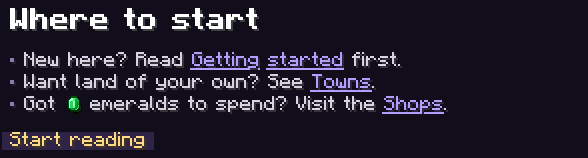
## Where to start
- New here? Read [Getting started](getting-started) first.
- Want land of your own? See [Towns](towns).
- Got  emeralds to spend? Visit the [Shops](shops).
{{button:Start reading|/guide getting-started}}
```
Each link is underlined and opens its page, and the button under them opens Getting started too.
A link to a page uses the page's name, its file name without the number and `.md`: `02-getting-started.md` is `getting-started`. Links can go elsewhere too:
| Write | Clicking it |
| ------------------------------------ | ------------------------------------ |
| `[Towns](towns)` | Opens your Towns page |
| `[our website](https://example.com)` | Opens a website, after the game asks |
| `[Go to spawn](command:/spawn)` | Runs `/spawn` as the player |
A command with a space in it needs `%20` in place of the space, since a link can't hold one: `[Shop](command:/warp%20shop)`. The editor writes that for you.
{% hint style="info" %}
A link to a page opens it straight away, without typing anything in chat, so nothing ends up in the player's command history.
{% endhint %}
## Buttons
A button is a link on a chip of its own. Put one at the bottom of the Getting started page:
```markdown
{{button:Go to spawn|/spawn}}
```
Clicking the button runs `/spawn` for the player.
And one at the bottom of the Shops page:
```markdown
{{button:Open the market|/warp market}}
```
Clicking it runs `/warp market`; a button's command can have spaces in it.
After the words comes where the button goes: a `/command`, a page's name, or a website. A picture from the `images` folder can go third, like `{{button:Shops|shops|nav-shops.png}}`, and `-` for the words shows the picture alone. `{{command:Spawn|/spawn}}` works the same as a button, as a plain clickable word without the chip.
The look of links and buttons is set by `a` and `button` in [style.css](/plugins/markdown-guide/make-it-look-like-your-server/style.md).
Next: [Pages for each player](/plugins/markdown-guide/write-the-pages/for-each-player.md).