> For the complete documentation index, see [llms.txt](https://esmp-fun.gitbook.io/plugins/llms.txt). Markdown versions of documentation pages are available by appending `.md` to page URLs; this page is available as [Markdown](https://esmp-fun.gitbook.io/plugins/markdown-guide/writing-pages/text.md).
# Text, headings and lists
Everything here is standard Markdown. If you have written a README on GitHub or a message on Discord, you already know most of it.
## Headings
```markdown
# Title of the page
## A section
### A smaller heading
```
The first `#` is the page's title. Every `##` is a section, listed under the page in the page list while it is being read. Sizes and colours are set in [style.css](/plugins/markdown-guide/look-and-layout/style.md).
## Paragraphs
Write sentences one after another and they flow into one paragraph, wrapped to fit the page. A blank line starts a new paragraph.
```markdown
This is one paragraph, even though it is written
on two lines.
This is the next one.
```
## Bold, italic and the rest
| Write | Shows |
| ------------------------- | ------------------------------------------------ |
| `**bold**` | **bold** |
| `*italic*` | *italic* |
| `struck through` | ~~struck through~~ |
| `` `code` `` | `code`, on a dark chip, shown exactly as written |
| `underlined` | underlined |
## Lists
```markdown
- A point
- Another point
- One under it, two spaces in
1. A first step
2. A second step
```
A wrapped line in a list starts under the first word above it, and numbers line up on their dots.
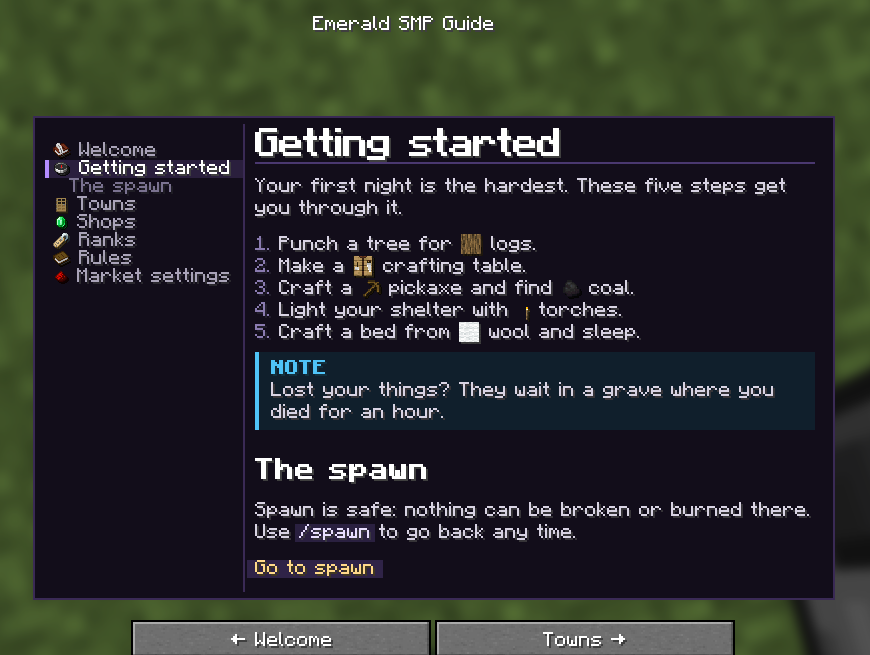
A numbered list, with item pictures in its steps.
## Quotes
```markdown
> Words from somebody else, set in from the edge.
```
A quote that starts with `[!NOTE]` and the like is a coloured box instead; see [Boxes and tables](/plugins/markdown-guide/writing-pages/boxes-and-tables.md).
## Code
`` `inline code` `` sits inside a sentence. Three backticks on their own line start and end a block shown exactly as written, tags and all:
````markdown
```
/town create MyTown
/town invite Steve
```
````
## A line across the page
```markdown
---
```
## Room between lines
Lines of text have two pixels of room between them by default. Change it with `line-spacing` in [style.css](/plugins/markdown-guide/look-and-layout/style.md).